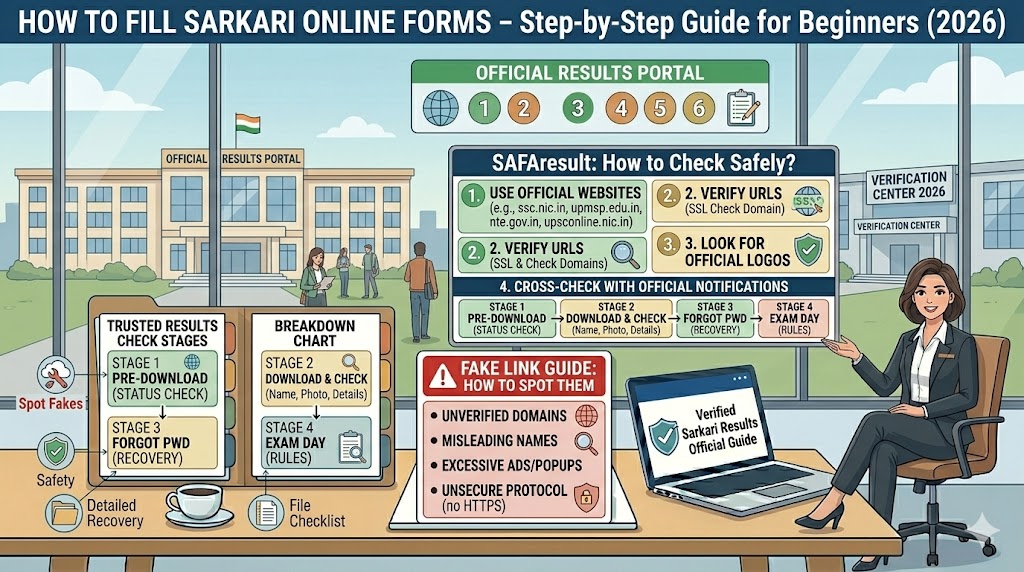
Every time a major government exam result is declared — SSC CGL, RRB NTPC, UPSC prelims, any state PSC — fake websites and phishing links flood the internet within minutes. Not hours. Minutes. Cyber fraudsters have server infrastructure ready before the result is officially announced, and they know exactly what aspirants will search for.
India’s NCIIPC (National Critical Information Infrastructure Protection Centre), the agency under the National Technical Research Organisation (NTRO), disclosed before a Parliamentary panel that it detected 1,172 phishing domains in the first half of 2025 alone — targeting banks, utility services, government welfare portals, and telecom services. Government exam portals are part of this same threat landscape. Bihar alone logged over 2.4 million cyber crime complaints in 350 days in 2025 — approximately one complaint every 12 minutes.
If you are a government exam aspirant, this is your safety manual. Bookmark it before your next result date.
What Actually Happens on a Fake Result Website
Most aspirants assume fake sites are just “wrong information” sources. They are active fraud infrastructure:
Data harvesting: You enter your registration number and date of birth. That data is logged instantly, sold, or used to build a targeted profile.
Financial fraud: After showing a fabricated “selected” or “merit list” result, the site prompts a ₹50–₹500 “document processing fee” or “verification deposit.” Once paid, the site disappears or cycles to a new demand.
Identity theft: Some sites request bank account numbers or UPI IDs under the guise of “salary account setup” or “joining formalities.”
Phishing calls: After you submit even basic details, fraudsters call from unknown numbers posing as SSC officers, railway officials, or HR representatives — with your own registration number cited to establish false credibility.
Malware installation: Clicking “Download Result PDF” on a fake site can install spyware on your device — particularly on Android phones where sideloaded APKs are common.
8-Point Checklist to Identify a Fake Result Website
Run through this before entering any personal detail on any result page. One red flag is enough to stop.
1. The URL must end in .gov.in or .nic.in
Every official Indian government website ends in .gov.in or .nic.in. Examples: upsc.gov.in, ssc.gov.in, nta.ac.in, biharboardonline.bihar.gov.in.
Fake sites use tricks like:
-
Extra words added:
rrbgov-result.in,upsc-result-2026.in -
Wrong domain extensions:
.co.in,.org.in,.com.cm,.net.in -
The word “official” in the URL itself:
sarkariresult-official.in— no real government website calls itself “official” in its own domain name
2. Check for HTTPS and a lock icon
Every genuine government portal uses HTTPS with an active SSL certificate — you will see a padlock icon in the browser address bar. If the browser shows “Not Secure” or the URL starts with plain http://, leave immediately.
3. Never trust WhatsApp, Telegram, or Instagram links
Genuine exam boards do not distribute result links through WhatsApp groups, Telegram channels, or Instagram DMs. If someone in a “Sarkari Result group” shares a result link, treat it as unverified until you confirm the result on the official board’s homepage directly.
4. Go to the official website first — every time
Before opening any third-party or forwarded link, navigate to the official exam board website directly. If a result has been declared, it will be visible on the official homepage. If it is not there, the result has not been declared regardless of what any other site says.
5. Spelling errors, blurry logos, broken links
Fake websites frequently have spelling mistakes in headings and buttons, low-resolution or slightly altered logos, mismatched fonts, and navigation links that go nowhere. The original site is polished — fakes rarely are.
6. Zero fees to check results — ever
No Indian government exam board charges any fee to view a result. If a website asks for ₹1, ₹50, or any amount to “unlock” or “confirm” your result, it is a scam. Full stop.
7. Verify the contact page
Genuine government portals list a physical office address, an official helpline number, and an official email ending in .gov.in or .nic.in. Fake portals either have no contact page or list Gmail and Yahoo addresses.
8. Be suspicious of “result PDF” forwards
Fraudsters create fake PDFs that mimic official formatting and insert fabricated roll numbers. Always compare against the official PDF on the board’s own website — check the page count, total selected candidates figure, and header formatting. Any deviation is a red flag.
Official Website List — Central Government Exams
Bookmark every relevant URL now — before your result date. This is when fake sites appear at the top of search results.
Official Website List — State PSCs and Recruitment Boards
⚠️ Note on MP vs Maharashtra PSC: mppsc.mp.gov.in is Madhya Pradesh PSC. mpsc.gov.in is Maharashtra PSC. These are frequently confused — verify the state name in your URL before entering any login details.
Official Website List — Board Exam Results (Class 10 & 12)
Pro tip: For board results, digilocker.gov.in is an official government platform where marksheets and scorecards are available in verified digital form. Cross-check any result here.
Third-Party Aggregator Sites — Use Only to Find the Link
A few private aggregator sites are widely used to track government exam notifications and links. They are not official portals, but they generally link to .gov.in URLs rather than hosting fake results:
-
sarkariresult.com — high traffic, generally links to official pages
-
freejobalert.com — notification aggregator
-
sarkarialert.net — link aggregator
The safe way to use them: Use the aggregator to identify that a result has been declared, then click through and verify that the final URL you land on ends in .gov.in or .nic.in before entering your registration number. Never enter personal details on the aggregator site itself.
Quick Identification Table
Five Safety Practices to Follow Before Every Result
Bookmark official sites now. Find the correct .gov.in URL before your result date and bookmark it. On result day, type or click the bookmark — never search on Google when results are announced, as paid fake ads appear at the top of search results specifically on high-traffic days.
Use DigiLocker. digilocker.gov.in is an official government platform — board marksheets, entrance exam scorecards, and academic certificates available in verified digital form.
Never share OTP or financial details. No government exam board will ask for your OTP, bank account number, UPI PIN, or wallet details for any result-related purpose at any stage.
Report fake websites immediately. File a complaint at cybercrime.gov.in or call the National Cyber Crime Helpline: 1930 (toll-free, available 24×7). Your complaint helps NCIIPC identify and block new phishing domains.timesofindia.indiatimes+1
Share the official URL with your network. Many frauds spread because someone in a trusted WhatsApp group forwards a fake link without knowing it is fake. Send the correct URL to your coaching group and family before results are declared.
If You Have Already Visited a Suspicious Site
If you accidentally submitted your details to a suspicious portal, act immediately:
-
Do not pay any amount they ask for — payment converts data theft into financial fraud
-
Change your email and portal passwords immediately
-
Alert your bank if any financial information was entered
-
File a complaint at cybercrime.gov.in or call 1930
-
Check your phone for any newly installed applications — remove anything you do not recognise
-
Inform the real exam board via their official helpline — boards can issue public warnings faster when specific fake sites are reported
Official website URLs are subject to change. Always verify from the exam board’s own press release or official social media before using any URL not bookmarked directly from a .gov.in page.
This website is independent and not affiliated with any government exam board, NCIIPC, NTRO, or the Ministry of Communications.
Written by Manish | Government exam preparation | sarkariexamresults.net
1 thought on “How to Check Sarkari Results Safely — Official Website List & Fake Link Guide (2026)”